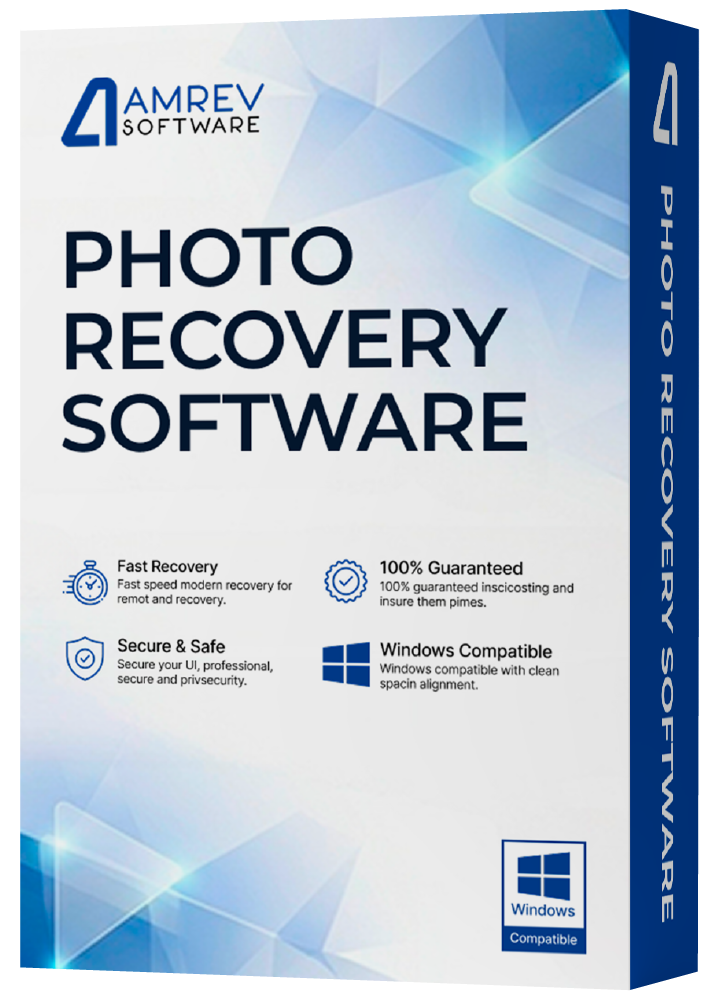
Recover deleted photos, videos, and audio files from all types of storage devices.

  • Recover deleted and formatted photos instantly
  • Supports SD cards, USB drives, cameras, and hard drives
  • Restore JPG, PNG, RAW, MP4, MOV, and other media files
  • Recover data lost due to deletion, formatting, or corruption
  • Fast, secure, and easy-to-use recovery process
Download Now Buy Now

100% Safe • Read-Only Scan • No Data Overwrite
Compatible with Windows 11 and 10

Easy Photo & Multimedia Recovery

Amrev Data Recovery Software helps recover deleted or lost photos, videos, and audio files from a wide range of storage devices. Whether data is lost due to accidental deletion, formatting, corruption, or virus attacks, the software provides a quick and reliable recovery solution.

The software supports recovery from hard drives, USB drives, SD cards, memory cards, digital cameras, flash drives, and other storage media commonly used to store multimedia files.

Smart & User-Friendly Recovery Process

Designed with simplicity in mind, the software features an intuitive interface that allows users to recover files without technical expertise. Advanced scanning algorithms thoroughly scan the storage device to locate recoverable files with high accuracy.

Recovered files are displayed in a well-organized tree structure, making it easier to preview and select the required files before recovery.

Supports Professional Photo Formats

In addition to standard image formats, the software also supports professional RAW photo formats used by DSLR and high-end digital cameras, making it suitable for photographers and professional users.

Preview Before Recovery

Preview recoverable photos and multimedia files before purchasing the software to verify recovery quality and ensure the required files can be restored successfully.

Recover from Multiple Data Loss Situations

The software can recover files lost due to accidental deletion, formatting, corrupted storage devices, file system errors, virus attacks, unexpected system shutdowns, and improper removal of memory devices.

Important Recovery Tips

  • Avoid copying new data to the affected storage device after data loss.
  • Do not format the drive or memory card repeatedly.
  • Install the recovery software on a different drive whenever possible.
  • Use trusted recovery software to avoid permanent data loss.

Prominent Features of Data Recovery Software

Supports a Wide Range of Photo Formats

Amrev Photo Recovery Software supports recovery of both standard and professional RAW image formats used by home users and professional photographers, including:

Standard Formats JPG, JPEG, BMP, PNG, GIF, TIF, TIFF, JP2, J2K, JPC
Raw (Professional) Formats CRW and CR2 (Canon), NEF (Nikon), ARW (Sony), ORF (Olympus), MRW (Minolta), PEF and DNG (Pentax), RAF (Fuji), X3F (Sigma), DNG (Leica) and RAW (Standard RAW file format).
Audio and Video Formats JPG, JPEG, BMP, PNG, GIF, TIF, TIFF, JP2, J2K, JPC

Supports a Wide Range of Storage Devices

Recover deleted photos, videos, and audio files from various storage devices, including memory cards, USB drives, hard drives, digital cameras, and other removable media.

Secure Digital (SD) Card Hard Drive (IDE / ATA / SATA / SCSI) Memory Stick PRO
Mini and Micro SD Cards ZIP Drive Memory Stick DUO
Mini and Micro SD Cards Pen Drive Memory Stick DUO
xD Picture Card Floppy Drive Compact Flash (CF)
USB Memory Card PDA PC Card Digital Cell Phone

Supports a Wide Range of Camera Brands

The software efficiently recovers deleted and lost photos from major digital camera brands, including:

Canon Kodak Sony HP
Nikon Fuji Samsung Casio
Panasonic Konica Sandisk LG
Pentax Minolta Lieca Toshiba
Phillips Sanyo Hitachi Lexar
Yashica Olympus Sharp Kyocera

Screenshots / How to use

Download and install Amrev Data Recovery Software on a healthy drive or partition.

Connect the storage device from which you want to recover deleted or lost data and ensure it is properly detected by your computer before starting the recovery process.

Note: Do not install, copy, or download any files to the same drive from which photos need to be recovered, as this may permanently overwrite the deleted files and make recovery impossible.

Step 1: Launch Amrev Photo Recovery (Win) Software

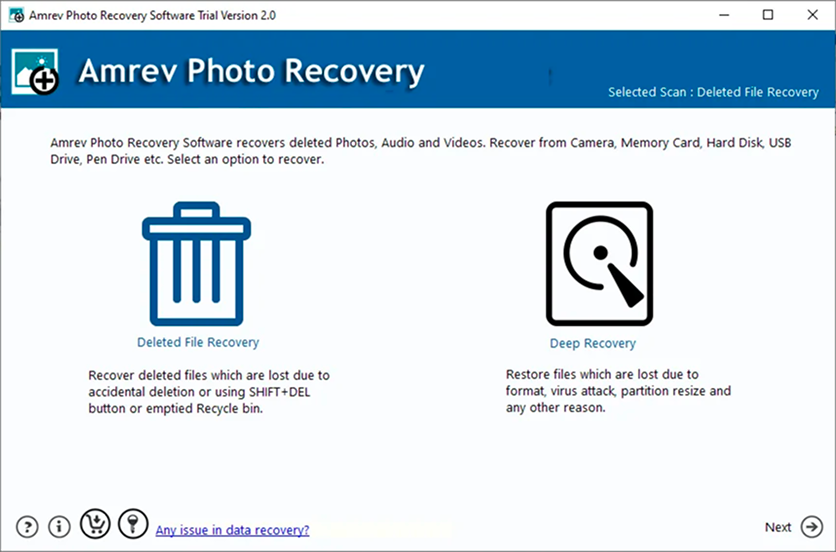
Launch the software either from desktop shortcut or Program folder and select appropriate option for recovery as shown in screenshot 1.
Deleted File Recovery: This option will recover deleted photos, audio and video files.
Deep Recovery: This option is to recover images from formatted drive.

Screenshot 1 : Photo recovery software main window

Step 2: Select Drive to Recover Files

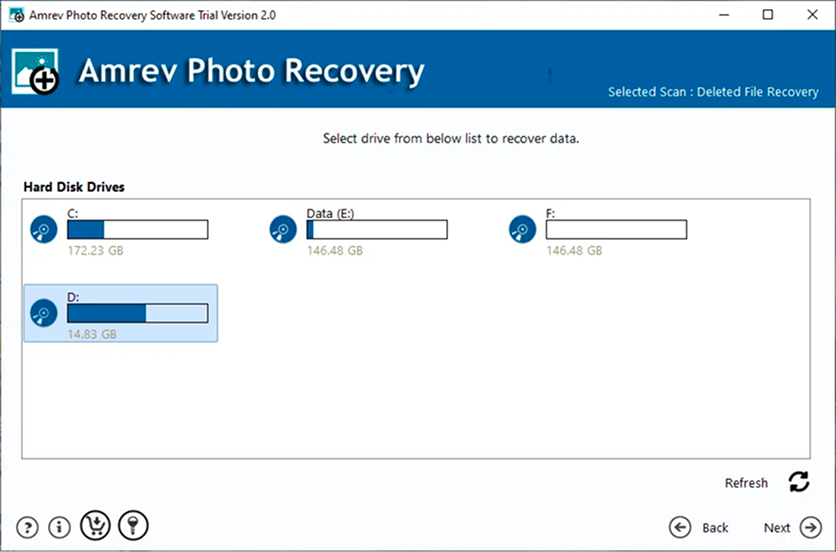
Connect the storage device (from which data needs to be recovered) to the computer where Photo Recovery Software is installed. Please ensure that the storage device is detected by your computer. Locally connected drives are displayed in the software. Select the drive from which, photos needs to be recovered and click on “Next” button.

Screenshot 2 : Select Drive to Recover Files

Step 3: Save the Recovered file

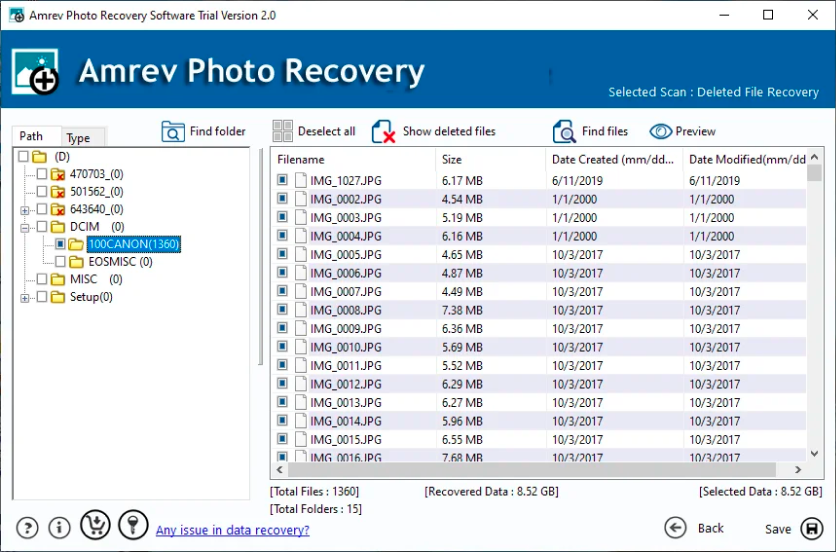
As soon as you click on “Next” button, Photo Recovery software starts the scanning and display in a well organized tree like structure of photos as shown in Screenshot 3

You may click on the recovered photo to preview, which gives you a fair idea of recovery possibilities and helps to evaluate the scan result in demo version.

Save the recovered data to a safe location by checking the photos you wish to save by clicking on “Save” button.

Screenshot 3 : Save the Recovered file

“Save” option is disabled in demo/trial version. In order to save the recovered data, you need to purchase the software.Do not save the recovered photos to the same drive from which, its being recovered. This would permanently overwrite the photos beyond recovery.

How to Activate the demo version to full version?

The demo version is exact replica of the full version except the saving option being disabled in demo version. In order to save recovered emails, you need a license key to activate the demo version to full version.

Software can be instantly activated with the help of:

  • An active internet connection on the computer where the software is installed.
  • License Key that you have received with order email after purchasing the software

Follow the simple steps to activate the software online

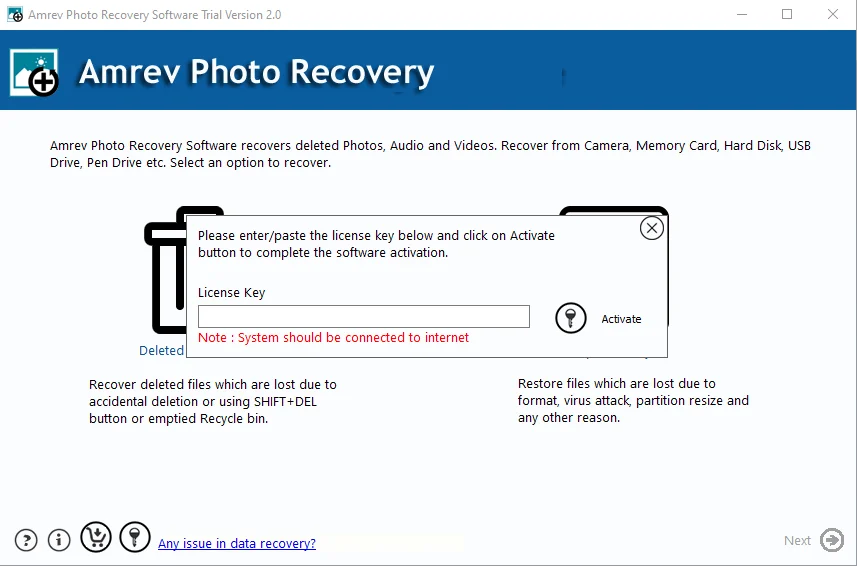
Step 1 Launch the application and click on “Activate” button from main application window as shown in screenshot.

Enter the License Key in the text field and click on “Activate” button. If you have entered a valid key, the software will be activated and confirmation message is displayed. The software is now fully functional.

Watch How to Recover Files

Follow along with our step-by-step video guide and recover your lost data in under 5 minutes.

Frequently Asked Questions

Yes, the software can recover permanently deleted photos, videos, and audio files removed from the Recycle Bin or deleted using Shift + Delete.

Yes, the Deep Recovery option helps recover files from formatted, corrupted, or inaccessible drives and partitions.

The software supports hard drives, SSDs, USB drives, SD cards, memory cards, digital cameras, and other storage devices.

Yes, you can preview recoverable photos and multimedia files before purchasing the full version.

Yes, the software is a read-only utility and does not overwrite or modify the original data during recovery.

The Save Scan feature allows you to save scan results and reload them later without rescanning the drive again.

Yes, the software can recover photos and multimedia files from corrupted or damaged memory cards and storage devices.

Stop using the affected drive immediately and avoid copying new files to it, as this may overwrite deleted data and reduce recovery chances.

What our customers say

Michael Leonard

Photo Recovery Software

A severe virus infection on my PC deleted more than 500 JPEG photos from my 16 GB USB drive. A data recovery technician suggested searching online for reliable photo recovery software, which led me to Amrev Software. The free version was able to preview most of my lost photos, so I decided to purchase the software. I successfully recovered my precious photo collection, and I am extremely thankful to the Amrev team for creating such an effective and easy-to-use photo recovery tool.

Jianhui

Photo Recovery Software

I tried numerous photo recovery programs, both free and paid, but the most successful among them was Amrev Photo Recovery. Using the software, I was able to recover almost 99% of my lost photos. Thanks to the Amrev team for such a reliable recovery solution.

Ronald Jackson

Outlook Email Recovery

My Outlook crashed unexpectedly, and I could no longer access my emails. I even tried using ScanPST, but it did not help. After trying several recovery methods, I finally discovered the Amrev PST Recovery tool. To my surprise, I was able to recover all my emails, attachments, and contacts successfully.

Customer

Photo Recovery Software

I thought my digital photos were gone forever after emptying the Recycle Bin, until I discovered and used Amrev Photo Recovery software. It helped me recover my lost photos quickly and easily. Truly a fantastic recovery tool!

Customer

Outlook Email Recovery

I had almost lost hope of recovering my deleted emails. They were extremely important business emails that I had accidentally deleted. Fortunately, Amrev Outlook Recovery software helped me recover all my important emails successfully. Thanks a ton to the Amrev team for such a reliable recovery solution!

Customer

Data Recovery Software

During our 30-day Europe trip, we accidentally lost all the photos stored on our camera. We were devastated and thought the memories were gone forever. After trying several recovery methods without success, I found Amrev Data Recovery Software online. Surprisingly, the software recovered all our deleted photos in just a few simple steps. Thanks to the Amrev team for creating such an amazing recovery solution!

John Clayton

Mac CEO

"I thought digital photos are gone forever after emptying the recycle bin, until I read about and used Amrev's Photo Recovery Software for Mac. Fantastic software indeed!! "

Bruce Margolis

Customer

"I just want to thank you very much for your prompt responses to my questions. This is "excellent" customer service. I will highly recommend Amrev Outlook Duplicate Email Remover to my friends that are interested in this type of software. "

Ronald Jackson

Customer

"To my bad, my outlook crashed and I could no more access my emails. I heard about scan pst software but was of no use. Finally, after all trial methods, I discovered Amrev PST Recovery tool. Surprisingly I recovered the entire emails along with the attachments and contacts. "

Michael Leonard

Customer

"I thought digital photos are gone forever after emptying the recycle bin, until I read about and used Amrev's Photo Recovery Software for Mac. Fantastic software indeed!! "

Jianhui

Customer

"I realize there are hundreds of programs and tried numerous online recovery programs, free and $$. The successful amongst all was Amrev Email Recovery Software, using which I recovered almost 99% of my lost emails. Thanks to Amrev!!! "

Ronald Jackson

Customer

"To my bad, my outlook crashed and I could no more access my emails. I heard about scan pst software but was of no use. Finally, after all trial methods, I discovered Amrev PST Recovery tool. Surprisingly I recovered the entire emails along with the attachments and contacts. "

Bruce Margolis

Customer

"I just want to thank you very much for your prompt responses to my questions. This is "excellent" customer service. I will highly recommend Amrev Outlook Duplicate Email Remover to my friends that are interested in this type of software. "

Photo Recovery Guides

Explore step-by-step guides to recover deleted files, photos, and emails on Windows.

Our products recover lost data quickly and securely

Trusted by 10k+ satisfied users who recommend our products..

Visit the Amrev product store

to explore our full range of software solutions.

Explorer